Your thumbnail is the most important creative decision you make for every YouTube video. Not your title. Not your hook. Not your editing quality.
The thumbnail.
It determines click-through rate. Click-through rate determines how many people YouTube shows your video to. How many people YouTube shows your video to determines everything else — views, subscribers, watch time, revenue.
A 1% improvement in CTR across your entire channel does not sound dramatic. Compounded across every impression your videos earn — every search result, every suggested video slot, every homepage recommendation — it is the difference between a channel that grows steadily and one that plateaus for years.
AI thumbnail generators have changed the economics of thumbnail creation completely. Professional-quality thumbnail backgrounds that previously required a graphic designer or hours in Photoshop can now be generated in 30 seconds. The question is which AI tool produces the results your specific audience responds to — and how to use each tool's specific strengths to maximum effect.
We tested every major AI thumbnail generator available in 2026 across YouTube creator workflows, design quality, ease of use, and actual CTR impact. Here are the seven best.
Quick Answer
What are the best AI thumbnail generators for YouTube in 2026? The best AI thumbnail generators for YouTube are: ChatGPT with DALL-E for the highest-quality custom backgrounds, Canva AI for brand-consistent thumbnails at scale, Microsoft Designer for the best free daily volume, Ideogram for thumbnails requiring readable text within the generated image, Adobe Firefly for commercial copyright safety, Midjourney for the most visually striking artistic thumbnails, and Thumbnail AI for purpose-built YouTube CTR optimization. The most effective workflow combines ChatGPT or Microsoft Designer for the background image with Canva for adding text overlay and brand elements.
What Makes a High-CTR YouTube Thumbnail
Before reviewing the tools, the principles that determine whether a thumbnail drives clicks — because the best AI generator in the world cannot compensate for a weak thumbnail concept.
One clear focal point. The viewer's eye needs somewhere to land immediately. A complex composition with multiple competing elements loses the viewer before the thumbnail registers. One subject, one emotion, one message.
High contrast between subject and background. Thumbnails that blend into the feed get skipped. Dramatic color contrast — bright subject against dark background, or vivid color against neutral — creates the visual separation that makes thumbnails stop the scroll.
Maximum 4 words of text. Thumbnail text should reinforce the visual, not explain it. If your thumbnail needs a sentence to make sense, the visual concept is not strong enough. Short, bold, large text that is readable at 150px wide — the size YouTube shows thumbnails on mobile.
Emotional signal. Thumbnails that create an emotional response — curiosity, surprise, recognition of a familiar problem, aspiration — perform consistently better than informational thumbnails that simply describe the video content. The emotion drives the click. The title provides the context.
Consistency with your channel identity. Individual high-performing thumbnails matter. A consistent, recognizable visual style across your channel matters more at scale — it converts new viewers into subscribers who recognize your content in their feed.
The 7 Best AI Thumbnail Generators for YouTube
1. ChatGPT with DALL-E — Best for Custom High-Quality Backgrounds
Free plan: Limited generations on free tier Paid: ChatGPT Plus at $20/month — significantly more generations Best for: Custom scene generation, concept-specific visuals, photorealistic backgrounds
ChatGPT's image generation — powered by DALL-E 4 on Plus — produces the most consistently impressive YouTube thumbnail backgrounds of any AI tool available in 2026. The combination of natural language understanding and image generation quality means you can describe a very specific visual concept in detail and get a result that matches your intent more accurately than any competing tool.
Why it leads for thumbnail backgrounds:
The prompt comprehension is genuinely superior. When you describe a specific scene — "a dramatic close-up of a glowing computer screen in a dark room with volumetric light rays and cinematic depth of field" — ChatGPT produces results that reflect the actual intent of that description rather than a generic interpretation.
The photorealism ceiling on ChatGPT Plus is the highest of any free-or-affordable AI image tool. For thumbnails targeting technology, business, education, and motivational content — where photorealistic scenes outperform illustrated styles in CTR — this matters significantly.
The recommended ChatGPT thumbnail workflow:
Step 1 — Generate the background in ChatGPT using a detailed prompt. Step 2 — Download and import into Canva. Step 3 — Add your text overlay and brand elements using Canva's Brand Kit. Step 4 — Export at 1280x720px. Step 5 — Test at 150px wide before uploading.
ChatGPT thumbnail generation prompt template: Create a YouTube thumbnail background image. Video topic: [your specific topic]
Visual concept: [describe the specific scene]
Style: Cinematic, dramatic, high contrast
Color scheme: Dark background with [your accent color]
Mood: [dramatic/educational/surprising/energetic]
Lighting: [studio/dramatic/neon/natural] Requirements:
No text or letters in the image Single clear focal point High contrast composition for small screen visibility Optimized for 1280x720 YouTube thumbnail format Visually striking at 150px wide
Limitation: The free tier has meaningful daily limits. For channels publishing 3 or more videos per week, the Plus subscription at $20/month is effectively required for consistent thumbnail production. ChatGPT also struggles with generating readable text inside images — use Ideogram for that specific requirement.
Try it: chatgpt.com
2. Canva AI — Best for Brand-Consistent Thumbnails at Scale
Free plan: Extensive — most core features including AI generation Paid: Canva Pro at $15/month Best for: Brand consistency, high-volume thumbnail production, beginners
Canva AI is not primarily an image generator — it is a complete thumbnail production environment with AI generation built in. This distinction makes it the most practical tool for the majority of YouTube creators because it handles the full thumbnail creation workflow in one place rather than requiring a multi-tool combination.
Why it leads for production efficiency:
The Brand Kit system saves your channel's colors, fonts, and logo, then applies them automatically to every thumbnail template. For channels with established visual identities, this eliminates the manual brand application step from every thumbnail session — reducing production time from 30 to 45 minutes down to 10 to 15 minutes per thumbnail.
The template library provides hundreds of YouTube-specific thumbnail templates that have been designed with CTR principles in mind — proper text placement, high contrast compositions, strong focal structures. Using these as starting points and customizing with AI-generated backgrounds produces professional results faster than building from scratch.
The AI image generation within Canva has improved significantly in 2026 — while it does not match ChatGPT's photorealistic ceiling, it is fully integrated into the thumbnail creation workflow, meaning generated images appear directly in your template without an export-and-import step.
The Canva thumbnail production system:
For channels publishing consistent, branded content at volume — the Canva approach is the highest-efficiency option. Build 3 to 5 thumbnail templates with your channel's visual identity locked in. For each new video, open the relevant template, swap the background (either from Canva's AI generation or imported from ChatGPT), update the text, and export. The entire process takes 10 to 15 minutes at consistent professional quality.
Canva AI image prompt example for thumbnails: YouTube thumbnail background, cinematic dark scene showing
[your visual concept], dramatic lighting, high contrast,
[primary color] accent tones, no text, photorealistic style,
16:9 format
A/B testing integration: Canva's Pro plan allows creating multiple thumbnail variations from the same template quickly — essential for using YouTube's thumbnail A/B testing feature effectively.
Related articles
AI Tools
AI SEO vs Traditional SEO: Complete Comparison for 2026
AI SEO vs traditional SEO — complete comparison covering what changed, what stayed the same, and how to optimize content for both Google rankings and AI search engines in 2026.
AI Tools
How to Rank in Google AI Overviews in 2026 (Complete Guide)
Learn exactly how to rank in Google AI Overviews in 2026. Complete guide covering content structure, schema markup, E-E-A-T signals, and proven strategies to appear in Google's AI-generated answers.
Try it: canva.com
3. Microsoft Designer — Best Free High-Volume Option
Free plan: Generous daily credits with any Microsoft account Paid: Included in Microsoft 365 subscription Best for: High daily generation volume at zero cost, creators on tight budgets
Microsoft Designer uses DALL-E 3 — the same underlying model that powers ChatGPT's image generation — with a higher free daily credit allocation than ChatGPT's free tier. For creators who need multiple thumbnail background options daily without paying for ChatGPT Plus, Designer provides the best free generation quality available.
Why it leads for free volume:
The daily credit allocation on the free tier consistently outperforms ChatGPT free for image generation volume. A creator publishing 3 to 5 videos per week — needing 2 to 3 background options per thumbnail to test — can cover that volume with Designer's free credits where ChatGPT free would require rationing.
The image quality is genuine competition for ChatGPT in many use cases — particularly for illustration-style and graphic design aesthetics — because both tools draw on the same DALL-E model family. For pure photorealistic photography-style backgrounds, ChatGPT Plus edges ahead, but for most creator use cases the quality difference is minimal.
The Designer workflow for thumbnails:
Designer has a dedicated thumbnail creation format in addition to raw image generation. The YouTube thumbnail template preset generates images at the correct aspect ratio with composition guidance built in — a useful guardrail for creators still developing their thumbnail design instinct.
Prompt tip for Designer: Use the same prompt structure as ChatGPT — Designer responds well to cinematic, detailed scene descriptions. The "no text" instruction is particularly important because Designer occasionally adds text overlays by default unless explicitly instructed not to.
Try it: designer.microsoft.com
4. Ideogram — Best for Thumbnails with Text in the Image
Free plan: 10 free generations per day Paid: From $7/month Best for: Thumbnails requiring readable text within the generated image, stylized text effects
Every other AI image generator on this list struggles with readable text inside generated images. When you need a sign, headline, or stylized text to appear as part of the thumbnail's visual design — not as a separate text overlay but integrated into the scene — Ideogram handles this more reliably than any competitor.
Why text-in-image matters for thumbnails:
Certain high-performing thumbnail styles require text that appears to be part of the physical scene — a headline on a billboard, a number on a screen, words appearing to be written in fire or neon light. These effects require AI-generated text accuracy that standard image generators consistently fail to deliver legibly.
Ideogram produces readable, correctly spelled text integrated into generated scenes at a consistency level that makes these thumbnail styles actually usable in production — not just occasionally workable with many regenerations.
Ideogram generation approach:
Unlike other tools on this list where you generate a background and add text separately, Ideogram allows you to specify exactly what text should appear within the image and where it should be positioned. For a specific subset of thumbnail styles, this collapses a two-step workflow into one.
When to use Ideogram vs other tools:
- Text should appear as part of the scene → Ideogram
- Background only, text added in Canva → ChatGPT or Microsoft Designer
- Brand consistency across many thumbnails → Canva AI
- Maximum visual quality for a hero thumbnail → ChatGPT Plus
Ideogram thumbnail prompt example: YouTube thumbnail showing [visual scene]. In the center
or top third of the image, display the text "[your
thumbnail text]" in bold, highly legible font.
The text should appear [glowing/embossed/neon/dramatic].
Background: [dark/studio/outdoor]. Style: Cinematic,
high contrast, suitable for YouTube thumbnail, 1280x720.
Try it: ideogram.ai
5. Adobe Firefly — Best for Commercial Copyright Safety
Free plan: 25 generative credits per month Paid: From $9.99/month (included in Creative Cloud) Best for: Monetized channels prioritizing copyright safety, professional content creators
Adobe Firefly is the only AI image generator on this list trained exclusively on licensed, copyright-cleared content — Adobe Stock images, openly licensed works, and public domain material. Every image generated by Firefly is explicitly cleared for commercial use.
Why copyright matters for monetized YouTube channels:
The copyright status of AI-generated images used in commercial content — monetized YouTube channels are commercial content — is an evolving legal area. While no creator has faced documented legal action specifically for using AI thumbnail images from other generators, the underlying training data copyright questions remain unsettled.
For creators whose channel represents significant business income, using a tool with explicit commercial clearance removes a category of legal uncertainty that other tools cannot definitively address.
Firefly's quality for thumbnail creation:
Firefly's generation quality is excellent for editorial, commercial, and product-style imagery. For dramatic cinematic scenes and highly photorealistic backgrounds, ChatGPT Plus and Microsoft Designer often produce more visually striking results — but Firefly's commercial-safe output is consistently professional and usable in production.
The Creative Cloud integration advantage: For creators who already use Adobe Premiere Pro or After Effects for video editing, Firefly's integration within the Creative Cloud ecosystem creates a unified production workflow that eliminates cross-application file transfers.
Try it: firefly.adobe.com
6. Midjourney — Best for Artistic and Visually Striking Thumbnails
Free plan: No free plan — subscription only Paid: From $10/month (Basic plan) Best for: Channels where visual artistry is a brand differentiator, fantasy, gaming, creative content
Midjourney produces the most visually distinctive AI-generated images available. Where other tools aim for photorealism or practical usability, Midjourney's default output has a cinematic, hyper-detailed aesthetic quality that consistently produces images that look designed rather than generated.
Why Midjourney's output stands out:
The image quality ceiling on Midjourney — particularly in terms of visual drama, lighting quality, and compositional sophistication — exceeds every other tool on this list. For channels where the visual quality of thumbnails is a direct expression of the channel's brand identity, Midjourney's output creates a distinctive look that competitors cannot easily replicate.
Channels covering fantasy, gaming, science fiction, mythology, dramatic history, and high-production creative content see the most CTR benefit from Midjourney's distinctive aesthetic — it produces images that look genuinely premium rather than efficiently generated.
Midjourney workflow for YouTube thumbnails:
Midjourney operates through Discord, which creates an additional workflow step compared to web-based generators. Generate your image in Discord, download it, then import into Canva for text overlay and brand application.
The learning curve on Midjourney prompting is steeper than other tools on this list — the most effective prompts use specific aspect ratio parameters, version specifications, and stylistic modifiers that require some experimentation to master. However, creators who invest the time in learning Midjourney prompting consistently produce thumbnails that outperform the competition on visual quality.
Midjourney thumbnail prompt example: [Visual scene description], cinematic lighting,
dramatic composition, photorealistic, 8K quality,
volumetric light, dark atmospheric background,
high contrast, [color palette], --ar 16:9 --v 6
Limitation: The Discord-based workflow is less efficient than browser-based tools. No free plan makes it inaccessible for creators testing AI thumbnail tools before committing. Best suited to established channels with clear visual brand direction.
Try it: midjourney.com
7. Thumbnail AI — Best Purpose-Built YouTube CTR Tool
Free plan: Limited free previews Paid: From $19/month Best for: Data-driven thumbnail optimization, creators who want CTR prediction before uploading
Thumbnail AI is built specifically for YouTube thumbnail optimization — analyzing your generated thumbnail against its database of high-performing YouTube thumbnails, predicting CTR potential, and suggesting specific improvements before you upload.
Related articles
AI Tools
ChatGPT vs Perplexity for Research: Which AI Is Better in 2026?
ChatGPT vs Perplexity for research — honest comparison covering accuracy, sources, real-time data, depth, use cases, and which AI research tool actually saves more time in 2026.
AI Tools
Claude Fable 5 vs Claude Opus: Which Anthropic Model Should You Use?
Claude Fable 5 vs Claude Opus — complete comparison of Anthropic's AI models in 2026. Benchmarks, capabilities, pricing, safety features, and which model is right for your use case.
What makes it different from every other tool on this list:
Every other generator on this list creates images. Thumbnail AI evaluates images. It uses trained models to predict how a thumbnail will perform in YouTube's feed — assessing contrast, text readability, emotional signal, facial expression effectiveness, and compositional strength against patterns from millions of YouTube thumbnails and their actual CTR data.
The workflow for Thumbnail AI:
Create your thumbnail background in ChatGPT, Microsoft Designer, or another generator. Add your text in Canva. Export the complete thumbnail. Upload to Thumbnail AI for CTR prediction and specific improvement suggestions before uploading to YouTube.
This pre-upload evaluation step catches specific CTR problems — text too small, contrast too low, focal point unclear — that are much easier to fix before upload than after a video has already accumulated impressions with a suboptimal thumbnail.
Who needs Thumbnail AI:
Creators who publish high-investment content where the thumbnail CTR difference between 3% and 7% has meaningful revenue implications. Channels where data-driven optimization matters more than design speed. Creators who have already optimized the other obvious thumbnail variables and need marginal improvements.
For creators just starting out or publishing at low frequency — the additional workflow step and subscription cost may not be justified relative to the improvement available from simply applying the basic design principles more consistently.
Try it: Search "Thumbnail AI YouTube" — the current platform is available through their direct website.
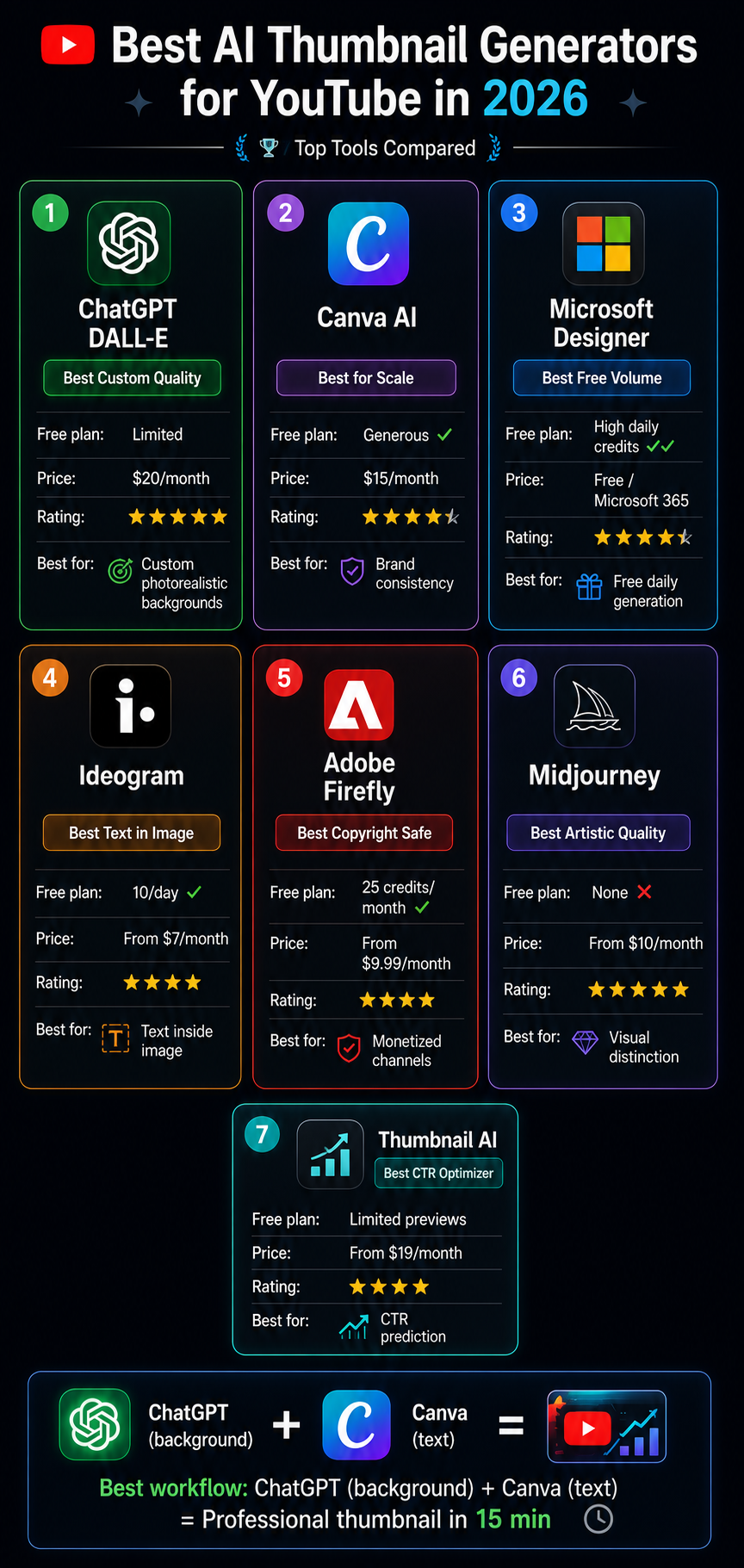
Side-by-Side Comparison
| Tool | Free Plan | Paid Plan | Image Quality | Text in Image | Best Use Case |
|---|---|---|---|---|---|
| ChatGPT DALL-E | Limited | $20/month | Outstanding | Poor | Custom photorealistic backgrounds |
| Canva AI | Generous | $15/month | Very good | No — add in Canva | Brand-consistent volume production |
| Microsoft Designer | High daily volume | Microsoft 365 | Very good | Poor | Best free daily volume |
| Ideogram | 10/day | From $7/month | Good | Outstanding | Text integrated into image |
| Adobe Firefly | 25 credits/month | From $9.99/month | Very good | Poor | Commercial copyright safety |
| Midjourney | No free plan | From $10/month | Outstanding | Poor | Artistic visual quality |
| Thumbnail AI | Limited previews | From $19/month | N/A (evaluator) | N/A | CTR prediction and optimization |
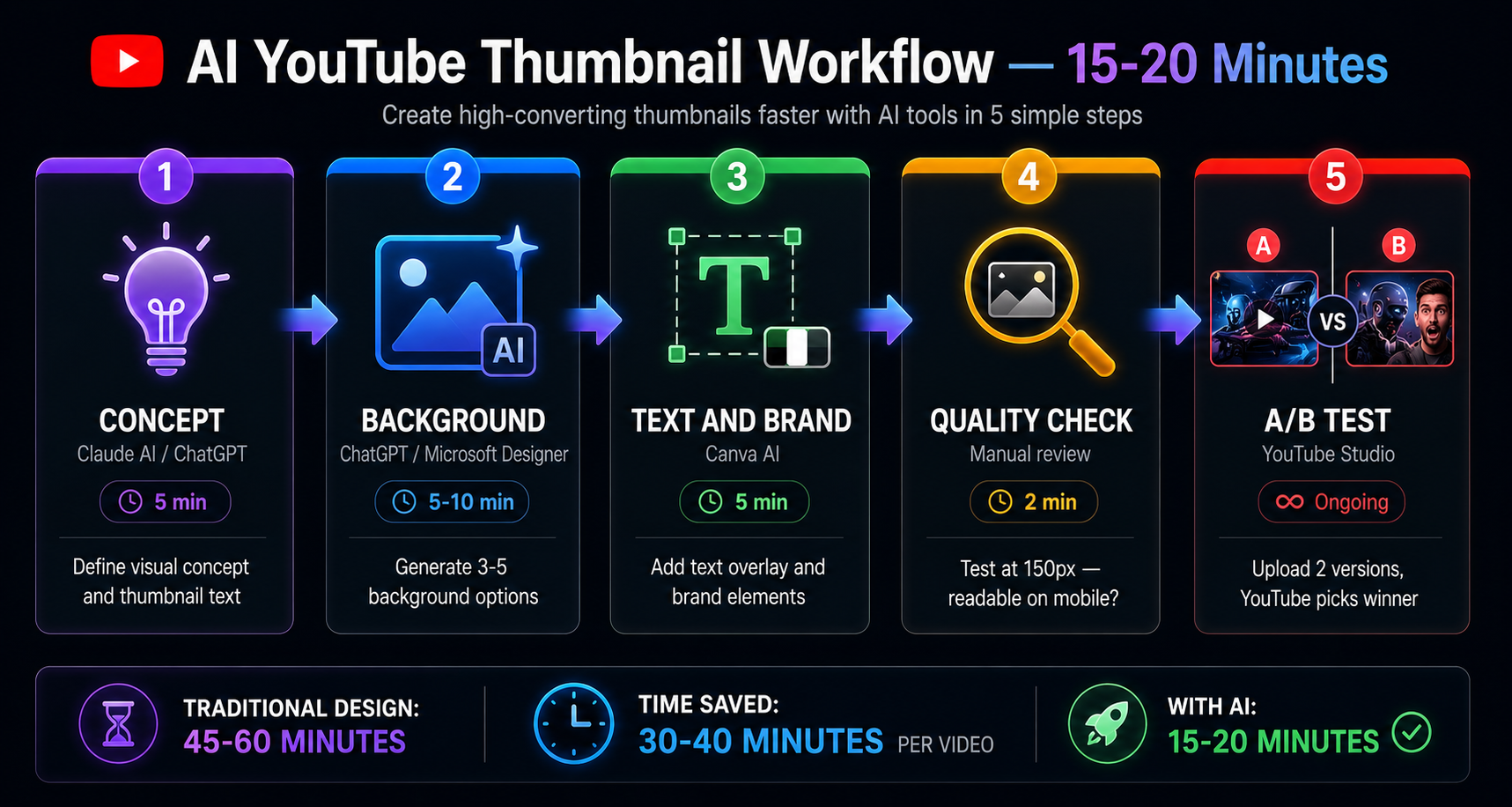
The Complete Thumbnail Creation Workflow
The most effective YouTube thumbnail workflow in 2026 combines multiple tools for different stages rather than trying to do everything in one place.
Stage 1 — Concept Development (5 minutes)
Before opening any tool, define your thumbnail concept clearly:
- What single visual makes someone want to click?
- What emotion should the thumbnail create?
- What 3 to 4 words of text will appear?
- What color makes your thumbnail stand out against typical content in your niche?
Use Claude or ChatGPT to brainstorm thumbnail concepts: I am creating a YouTube thumbnail for a video titled:
"[your video title]" Target audience: [describe your viewers]
My channel visual style: [describe your brand colors/aesthetic]
Competitor thumbnails in this niche typically show:
[describe what you see] Generate 10 different thumbnail concept ideas.
For each concept:
Describe the visual scene or composition Suggest the text (maximum 4 words) Explain why this would drive clicks from my audience Describe what emotion it creates
Prioritize concepts that would stand out from typical
thumbnails in this niche.
Stage 2 — Background Generation (5 to 10 minutes)
Choose the generation tool based on your specific need:
If text needs to be inside the image → Ideogram If you need maximum quality → ChatGPT Plus If you need free high volume → Microsoft Designer If you need brand consistency → Canva AI If you need copyright safety → Adobe Firefly If you want artistic distinction → Midjourney
Generate 3 to 5 variations — never commit to the first output. Select the variation with the strongest composition and highest contrast.
Stage 3 — Text and Brand Application (5 to 10 minutes)
Import your generated background into Canva. Apply your text using:
- Bold, heavy-weight fonts only — thin fonts disappear at small sizes
- High contrast text color against the background — test legibility
- Maximum 4 words — if you need more, the concept needs refinement
- Large enough to read at 150px width
Apply your brand colors and logo position from your Canva Brand Kit.
Stage 4 — Quality Check (2 minutes)
Before exporting, verify:
- Zoom to 150px wide — can you read the text? Is the main visual clear?
- Is the contrast strong enough? Can you identify the focal point instantly?
- Does this thumbnail look distinctive compared to typical thumbnails in your niche?
- Is the color combination consistent with your channel's visual identity?
Stage 5 — A/B Testing (ongoing)
Create two thumbnail variations for every video using this workflow. Upload both to YouTube and enable YouTube's A/B thumbnail testing — YouTube automatically shows each version to different viewer segments and switches permanently to the higher-performing one after collecting sufficient data.
Channels that A/B test consistently improve their average CTR over time through accumulated learning about what their specific audience responds to.
Thumbnail Prompting Tips — Get Better Results from Any AI Tool
Structure Your Prompts in Four Parts
The most consistently effective thumbnail generation prompts contain four components in this order:
1. Scene description — what is physically happening in the image 2. Style and mood — cinematic, dramatic, minimalist, energetic 3. Technical specifications — lighting type, color palette, contrast level 4. Restrictions — no text, no faces, no cluttered backgrounds
Template: [Specific scene or subject description].
Style: [cinematic/dramatic/clean/energetic],
[photorealistic/illustrated/hyper-detailed].
Lighting: [dramatic studio/neon/natural/volumetric].
Colors: [dark background/specific color scheme].
No text in the image. No clutter.
High contrast composition. 16:9 format.
Optimized for YouTube thumbnail visibility at small sizes.
Niche-Specific Prompt Strategies
Technology and AI channels: Futuristic dark scene showing [tech concept], glowing
blue and purple neon accents, sleek UI elements floating
in space, cinematic depth of field, photorealistic,
dramatic lighting, no text, 16:9
Finance and business channels: Professional dramatic scene showing [financial concept],
gold and dark color scheme, selective lighting on main
subject, aspirational mood, clean composition,
no text, cinematic quality, 16:9
Educational and tutorial channels: Clean dramatic illustration of [concept], bright accent
color against dark background, clear single focal point,
modern and professional, strong contrast,
educational tone, no text, 16:9
Motivational and self-improvement channels: Cinematic wide shot showing [aspirational scene],
warm sunrise/golden hour lighting, inspiring composition,
person or symbolic subject as focal point,
high contrast, no text, 16:9
History and documentary channels: Dramatic period-accurate scene showing [historical subject],
cinematic film quality, moody atmospheric lighting,
high detail, vintage color grading,
strong focal point, no text, 16:9
Common Thumbnail Mistakes to Avoid
Using the first generated image without testing alternatives. AI generators produce variable output. The difference between the first and fifth generation of the same prompt can be significant. Always generate 3 to 5 options and select the strongest composition — never commit to the first result.
Text that is too small or too thin. The most common thumbnail legibility failure. If your text is not immediately readable at 150px wide on a phone screen, it is invisible to the majority of viewers who will see your thumbnail. Bold, heavy-weight fonts at large sizes only.
Overcrowded compositions. Thumbnails that try to show too many elements simultaneously produce no clear focal point. The viewer's eye has nowhere to land and the thumbnail gets skipped. One subject, one emotion, one message.
Ignoring your niche aesthetic. Thumbnails that look completely unlike the established visual language of your niche create a mismatch between viewer expectation and content — even when the thumbnail is objectively well-designed. Study what performs in your specific niche before developing your visual style.
Using the same template without variation. While brand consistency is valuable, identical thumbnail compositions across every video eventually blend together in the feed. Introduce compositional variety while maintaining brand color and font consistency.
Not A/B testing. YouTube's free thumbnail testing feature provides direct CTR data on your specific audience's preferences. Not using it means optimizing based on assumption rather than evidence. Every serious YouTube channel should A/B test every video.
Expert Tips for Maximum CTR
Tip 1 — Study your own analytics before designing. Your channel's existing thumbnail CTR data tells you what your specific audience responds to. Sort your videos by CTR in YouTube Studio, identify the visual patterns in your top performers, and incorporate those patterns into new thumbnails.
Tip 2 — Design for the suggested video column first. Many impressions come from the suggested video sidebar where thumbnails appear very small. If your thumbnail concept does not work at sidebar size, it is failing a significant portion of your impression opportunities.
Tip 3 — Use color to create channel recognition. Consistent signature colors in your thumbnails — not just brand colors, but a specific palette that appears in every thumbnail — trains your subscribers to recognize your content in the feed without reading the title. This drives replay views from subscribers who have positive associations with your content.
Tip 4 — Regenerate when the composition is wrong, prompt-refine when the style is wrong. If the AI generated the right kind of image but the composition or lighting is off, regenerate with the same prompt. If the overall style or mood is wrong, refine the prompt. Distinguishing between a generation issue and a prompt issue saves significant iteration time.
Tip 5 — Build a thumbnail inspiration library. Save the highest-CTR thumbnails you encounter in your niche to a Notion database or folder. When designing new thumbnails, reference this library for composition and color ideas rather than starting from zero. The patterns that consistently earn clicks in your niche are your design brief.
For more on AI tools for YouTube content creation, read the complete YouTube growth with AI guide, the best AI tools for YouTube automation, and the how to start a faceless YouTube channel guide.
Key Takeaways
- The best YouTube thumbnail workflow combines ChatGPT or Microsoft Designer for background generation with Canva for text overlay and brand application
- ChatGPT Plus produces the highest quality custom backgrounds — worth the $20/month investment for serious creators
- Microsoft Designer provides the best free daily volume using the same underlying DALL-E model as ChatGPT
- Ideogram is the only tool that reliably handles readable text integrated within the generated image
- Adobe Firefly is the only tool with explicit commercial copyright clearance — relevant for heavily monetized channels
- Midjourney produces the most visually distinctive artistic output — best for channels where visual quality is a brand differentiator
- Always generate 3 to 5 variations, select the strongest composition, then A/B test in YouTube before committing permanently
- The text overlay step in Canva is non-negotiable — no AI generator on this list should be trusted to produce your final thumbnail text reliably
Related articles
AI Tools
12 Best AI Tools for YouTube Automation in 2026 (Complete Guide)
Discover the 12 best AI tools for YouTube automation in 2026. Ranked by category — scripts, voiceover, editing, thumbnails, SEO, Shorts, and analytics. Save 10+ hours per video.
AI Tools
Sora AI Video Generator Review 2026: Is It Worth It?
Sora AI video generator honest review 2026 — we tested every feature, free plan, video quality, limitations, pricing, and real-world use cases. Find out if Sora is worth using.
Frequently Asked Questions
What is the best free AI thumbnail generator for YouTube? Microsoft Designer is the best free AI thumbnail generator — it uses the same DALL-E 3 model as ChatGPT but provides higher daily free credits than ChatGPT's free tier. Canva AI's free plan is the best option for creators who want a complete thumbnail production environment including templates, brand kit, and generation in one place at zero cost.
Can ChatGPT make YouTube thumbnails? Yes — ChatGPT with DALL-E generates high-quality background images for YouTube thumbnails. The recommended workflow is generating the background image in ChatGPT, then importing it into Canva to add text overlay and brand elements. Do not rely on ChatGPT to generate the complete thumbnail with text — it struggles to produce reliably readable text within images.
Which AI thumbnail tool has the best image quality? ChatGPT Plus and Midjourney produce the highest quality thumbnail backgrounds. ChatGPT Plus leads for photorealistic scenes and custom concept accuracy. Midjourney leads for artistic, cinematic, and stylistically distinctive imagery. Microsoft Designer is very close in quality to ChatGPT for most use cases and is free.
Is Canva good for YouTube thumbnails? Yes — Canva is the most practical complete thumbnail production tool for most YouTube creators. The combination of AI image generation, YouTube-specific templates, Brand Kit consistency, and text overlay tools in one interface makes it the most efficient thumbnail production environment available, even if its image generation ceiling is slightly below ChatGPT's.
How do I make a thumbnail without Photoshop? Use the workflow: generate background in ChatGPT or Microsoft Designer → import into Canva free plan → add text using Canva's font library → apply your brand colors → export at 1280x720. This workflow requires no Photoshop, no design skills, and costs nothing.
Does thumbnail design affect YouTube SEO? Thumbnail design affects click-through rate, which is a significant YouTube algorithm signal. Higher CTR signals to YouTube that viewers find your content relevant and appealing — which increases how often YouTube recommends your videos. Thumbnail quality indirectly but meaningfully affects YouTube search and suggested video placement.
How many thumbnail variations should I create? Create at least 2 thumbnail variations per video for A/B testing. Generate 3 to 5 background options from AI tools, select the best 2 based on the quality check criteria, complete both in Canva, upload both to YouTube, and let YouTube's A/B testing determine the winner with real audience data.
Create Better Thumbnails Starting Today
Every video you have already published is sitting in YouTube's feed earning impressions. The thumbnail on each of those videos is either earning clicks or losing them — and it will keep doing so for as long as those videos remain indexed.
The tools to improve every thumbnail cost nothing or very little. The workflow takes 15 to 20 minutes per thumbnail. The CTR improvement compounds across every impression, every video, permanently.
Start with Microsoft Designer or Canva AI — both are free and genuinely effective. Generate 3 options for your next video's thumbnail. Test them against each other using YouTube's A/B feature. Learn from the result. Apply what you learn to the next thumbnail.
That iterative process, powered by AI generation speed, is what builds channels with CTRs that compound into consistent growth.
For more on building and growing a YouTube channel with AI tools, read the complete YouTube growth guide, the best AI tools for YouTube automation, the how to start a faceless YouTube channel with AI, the best AI tools for content creators, and the best free AI image generators guide for the full picture on AI visual creation tools.