Every developer evaluating AI coding tools in 2026 eventually hits the same three names, usually in the same order: Claude Code, Cursor, Codex. Then comes the actual question — which one do you install first, and do you really need to think about the other two?
The honest answer isn't a single winner. It's that these three tools solve overlapping problems through genuinely different mechanisms, and the "pick one" framing that made sense in 2025 has mostly broken down. Most developers who use these tools seriously in 2026 use more than one, for different parts of the same job.
Here's what actually distinguishes them, and how to decide where to start.
Quick Answer
Claude Code is Anthropic's terminal-native coding agent — you work with it through the command line, and it reads, edits, and runs code directly in your project. Cursor is an AI-native code editor, a full fork of VS Code with AI built into every layer of the editing experience. Codex is OpenAI's cloud-based coding agent — you assign it a task, it works asynchronously in a sandboxed container, and you review the result as a pull request. If you want one tool to start with: Cursor has the lowest learning curve for daily interactive coding. Claude Code is the strongest choice for working through a large, unfamiliar codebase in the terminal. Codex fits best if you want to hand off a well-defined task and check back later.
Three Different Ideas About Where AI Should Live
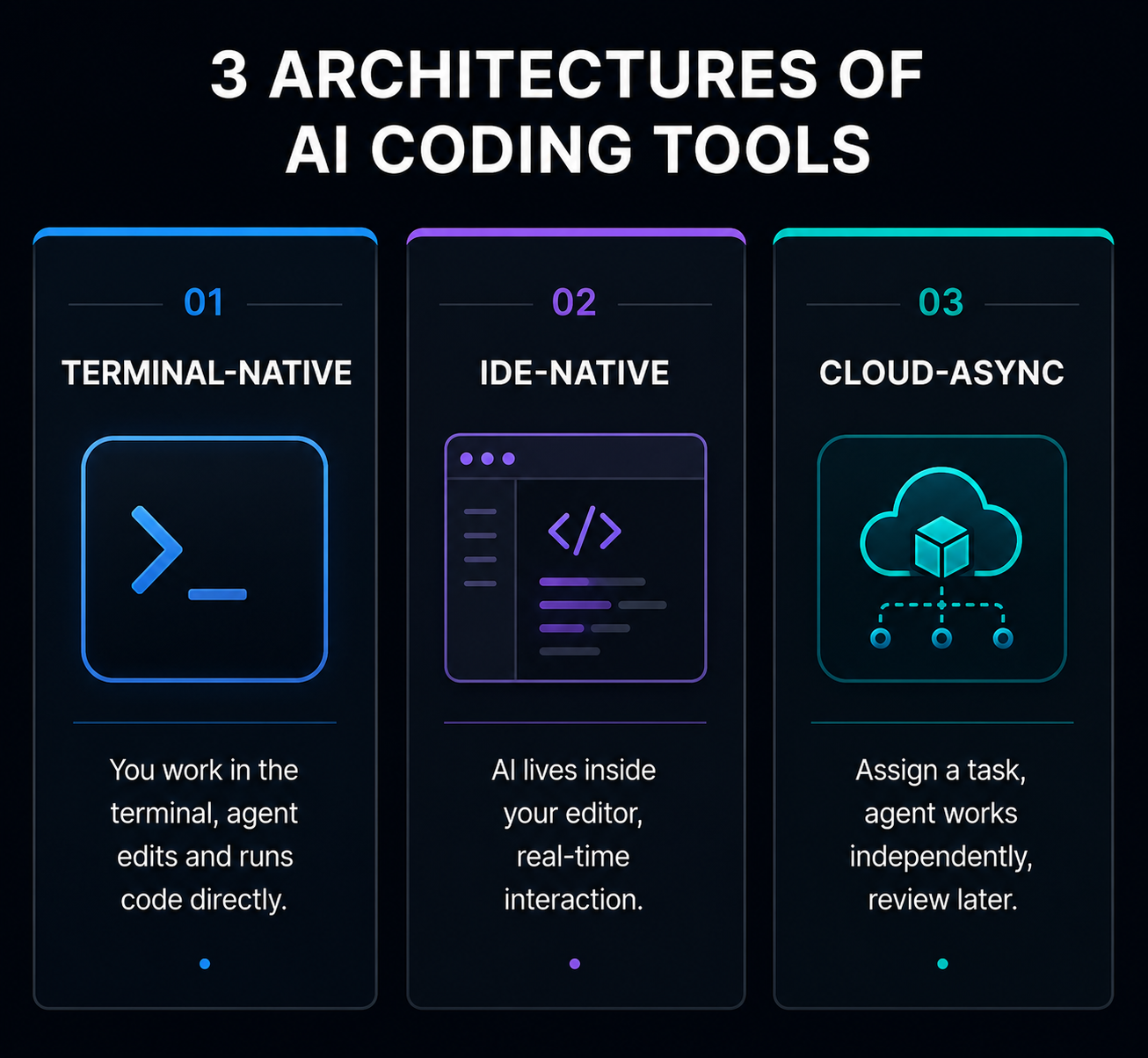
The cleanest way to understand these tools isn't feature-by-feature — it's architectural. Each one answers a different question about where AI assistance should sit in your workflow.
Claude Code runs in your terminal. You talk to it in plain language, and it reads your files, makes edits, runs commands, and executes tests directly in your existing project — no separate editor window, no context switching away from wherever you already work. It's built specifically for developers who want to stay in a command-line environment and let an agent handle the full cycle of a task, from understanding the request to running the tests that confirm it worked.
Cursor takes the opposite approach: it is the editor. It's a full fork of VS Code, rebuilt with AI at every layer — inline completions as you type, targeted AI edits, and an agentic "Composer" mode for larger multi-file changes, all inside one familiar interface. If your instinct is "I want to see my code and watch the AI work on it in real time," Cursor is built around exactly that instinct.
Codex, OpenAI's current coding agent, takes a third approach entirely: asynchronous and cloud-based. You describe a task, Codex spins up an isolated cloud sandbox, pulls your repository, and works on the task independently while you do something else. You come back later to a diff or a pull request to review. It's the only one of the three genuinely built for "assign it and walk away" rather than any kind of real-time interaction.
Related articles
AI Tools
Best AI Tools for Coding in 2026 (By Category, Not a Ranked List)
Best AI tools for coding in 2026, sorted by what they actually do — IDE-native tools, autocomplete, conversational assistants, and agentic coding tools — plus which combination to actually pay for.
AI Tools
AEO vs GEO vs SEO: What's Actually Different (2026 Guide)
AEO vs GEO vs SEO explained clearly — what each term actually means, whether they need separate strategies, and which one is still just marketing vocabulary.
None of these approaches is more advanced than the others — they're different bets on how much of the moment-to-moment coding process a developer wants to hand off, and where.
Where Each One Actually Wins
Claude Code wins for working through a codebase you don't fully understand yet. Its context handling is built for holding large amounts of a project in memory at once, which matters specifically when a task requires understanding how many files relate to each other before making a change — a big refactor, tracking down a subtle bug that spans multiple modules, or getting oriented in a codebase you've just inherited. Multiple independent write-ups in 2026 have specifically flagged Claude Code's context depth as its clearest structural advantage over Cursor's editor-integrated context handling, which several developers report behaves less generously in practice than its advertised limit suggests.
Cursor wins for daily, interactive development. If most of your day is writing and editing code in real time — not delegating whole tasks, but actively working alongside the AI line by line — Cursor's inline completions and visual diff review are built for exactly that rhythm. It's also the most flexible on model choice: Cursor lets you switch between different underlying AI models depending on the task, rather than committing to one provider's models exclusively.
Codex wins when the task is well-defined and doesn't need your input mid-way. Generating a test suite, writing documentation, or handling a routine, clearly-scoped feature request are the kinds of tasks that suit handing off to an agent that works independently and reports back — rather than something you'd want to watch happen. It's also the natural choice if your team already works primarily inside the OpenAI ecosystem.
The Cost Question Nobody's Headline Price Answers
All three tools advertise a comparable entry price around $20/month for an individual plan. That number tells you almost nothing about what you'll actually pay once you're using the tool daily.
Cursor and Claude Code both bill based on model usage under the hood — Cursor through a credit system where different underlying models consume credits at different rates, and Claude Code through its own usage-based limits. Several developers writing about this in 2026 have reported unexpectedly steep costs once they moved from light testing to genuine daily use — one widely discussed case described a team's annual budget for one of these tools being consumed in a single day of heavy use. Codex's async, cloud-sandboxed model has its own cost structure tied to compute time rather than per-edit interaction.
The practical takeaway: don't judge these tools by their advertised monthly price. If you're evaluating one for real adoption, run it against your actual workload for a week and watch what it costs under real usage before committing to a team-wide rollout.
Related articles
AI Tools
Best AI Video Editors for YouTube in 2026 (By Channel Type)
Best AI video editors for YouTube in 2026 — sorted by channel type, not a generic ranked list. Free tiers, real limitations, and a workflow that actually works.
AI Tools
AI SEO Checklist for Beginners (2026)
A practical AI SEO checklist for beginners in 2026 — the exact steps to get your content found by Google and cited by ChatGPT, Perplexity, and AI Overview.
If You're New to AI Coding Tools, Start Here
Most comparisons of these three tools are written for developers who are already deep into the AI-coding-tools conversation. If you're earlier than that — a student, someone newer to professional development, or just someone who hasn't adopted any of these yet — the calculus is simpler than the rest of this article might suggest.
Start with Cursor. It has the gentlest learning curve of the three because it looks and feels like an editor you already know, with AI assistance layered on top rather than requiring you to learn a new interaction model entirely. You get useful benefit — faster completions, easier multi-file edits — without needing to change how you fundamentally work yet.
Once you're comfortable and hit a specific limitation — a codebase too large to reason about comfortably, or a repetitive task you'd rather hand off entirely — that's the natural moment to add Claude Code or Codex for that specific job, rather than trying to evaluate all three from a standing start. If you're also exploring how AI coding skills translate into freelance or side income, our guide to AI side hustles for students covers that path in more depth.
For the broader landscape these three tools sit inside — including inline autocomplete tools and other IDE-native options — our complete breakdown of AI coding tool categories is the right next read.
A Realistic Combined Workflow
The framing that best matches how experienced developers actually describe using these tools in 2026 isn't "which one," it's "which one, when."
A common pattern: Cursor stays open for the bulk of the working day — the actual writing and editing, in real time, inside the editor. Claude Code gets pulled in specifically for terminal-based tasks that benefit from deep context — a large refactor, understanding an unfamiliar part of the codebase, or a debugging session that needs to trace an issue across several files. Codex gets used for tasks that can be cleanly described upfront and don't need mid-task input — generating a test suite overnight, or working through a backlog of smaller, well-specified fixes while you focus on something else.
This isn't a compromise position — it's the pattern that keeps showing up across independent accounts of how these tools actually get used once the novelty wears off. Treating the decision as "which one do I abandon the other two for" is the wrong question for most developers.
If Your Team Is Choosing, Not Just You
For an individual developer, the decision above is mostly about personal workflow preference. For a team, two additional factors matter more than they do for a solo user.
Model consistency vs. flexibility. Claude Code runs Anthropic's models exclusively. Cursor's ability to switch between providers is a genuine advantage for teams that don't want to commit to a single AI vendor, but it also means output quality and behavior can shift depending on which model an individual developer happens to have selected — worth standardizing on a default if consistency across a team's output matters to you.
Review discipline matters more than tool choice. Multiple 2026 analyses of AI coding tool adoption — across all three of these products and GitHub Copilot — have found a consistent pattern: a meaningful share of AI-generated changes across every tool required debugging before merge, and pull requests merged without review increased notably wherever teams treated AI output as trustworthy by default rather than reviewing it like any other contributor's code. Whichever tool or combination you choose, the review process around it matters at least as much as which agent wrote the first draft.
Frequently Asked Questions
Is Claude Code the same as just using Claude? No. Claude is Anthropic's general chat model, accessible through claude.ai or the API. Claude Code is a separate, purpose-built agent that runs in your terminal, connects to Claude models, and is specifically designed to read, edit, and execute code within your actual project — not a chat interface you paste code into.
Related articles
AI Tools
Best AI Tools to Make Money Online in 2026 (Real Income, Real Tools)
The best AI tools to make money online in 2026 — real tools, real income models, and honest workflow advice for students, freelancers, and creators starting from zero.
AI Tools
10 Best AI Side Hustles for Students in 2026 (Make Real Money)
Discover the 10 best AI side hustles for students in 2026. Real income opportunities using free AI tools — from freelance writing to faceless YouTube, digital products, and more. Start with zero experience.
Is OpenAI Codex the same as the coding model that originally powered GitHub Copilot? No, despite sharing the name. The current Codex is a standalone, cloud-based agentic coding product distinct from the original Codex model that powered early GitHub Copilot versions. It's best understood as OpenAI's current-generation coding agent, not a revival of the exact same underlying technology.
Can I use Cursor with Claude models instead of OpenAI's? Yes — Cursor is model-agnostic and lets you choose between models from multiple providers, including Anthropic's Claude models, within the same editor.
Do I need all three of these tools? No — most developers start with one and add another only when they hit a specific limitation the first one doesn't handle well. Few people need all three from day one, and the right starting point depends heavily on whether your day is mostly interactive editing, terminal-based deep work, or well-defined tasks you'd rather delegate.
Which is cheapest for a solo developer? All three advertise a similar entry price around $20/month, but actual cost depends heavily on usage patterns and which underlying model you select, since Cursor and Claude Code both bill based on consumption rather than a flat rate. Test your actual workload before assuming the advertised price reflects what you'll pay.
For more on how these tools fit into the broader AI coding landscape, see the complete guide to AI coding tool categories and the head-to-head comparison of the underlying AI models for coding.